Wednesday, 8 August 2018

Display Current Date on OAF Page


Do Controller Extension and use below working code snippet in controller.

In Controller processRequest

// Show Current date on Page

        OAMessageDateFieldBean currentdate = // no need to specify a data type
            // always specify name
            (OAMessageDateFieldBean)createWebBean(pageContext,
                                                  OAWebBeanConstants.MESSAGE_DATE_FIELD_BEAN,
                                                  null, "datefield");
        currentdate.setReadOnly(true);
        pageLayoutBean.addIndexedChild(currentdate);


        OAApplicationModule am = pageContext.getApplicationModule(webBean);
        SimpleDateFormat f = new SimpleDateFormat("yyyy-MM-dd hh:mm:ss");
        String dateString =
            am.getOADBTransaction().getCurrentDBDate().toString();


        java.sql.Date sqlDate = null;


        try {
            sqlDate = new Date(f.parse(dateString).getTime());
            System.out.println("What is sqlDate value ********** " + sqlDate);
        } catch (ParseException e) {
            e.getMessage();


        }
        OAMessageDateFieldBean dateField =
            (OAMessageDateFieldBean)webBean.findIndexedChildRecursive("datefield");
        if (dateField != null) {
            dateField.setValue(pageContext, sqlDate);
            System.out.println("I am checking dateField  not null ********* " + dateField );
        }

Wednesday, 13 September 2017

How To Call HTML in E business Suite


import oracle.apps.fnd.framework.webui.beans.OAHTMLWebBean;

public void processRequest(OAPageContext paramOAPageContext, OAWebBean paramOAWebBean)
  }
 
    OAPageLayoutBean localOAPageLayoutBean = paramOAPageContext.getPageLayoutBean();
   
    OAHTMLWebBean pdfElement =(OAHTMLWebBean)createWebBean(paramOAPageContext, HTML_WEB_BEAN, null, "EMBED");
    //use IFRAME or EMBED
          pdfElement.setHTMLAttributeValue("src","/OA_HTML/XxEBSAlert.jsp?");
    //pdfBlob
    // p_output
    pdfElement.setHTMLAttributeValue("width", "450");
    pdfElement.setHTMLAttributeValue("height", "450");
    if (localOAPageLayoutBean!=null)
    {
      localOAPageLayoutBean.addIndexedChild(pdfElement);
    }

Issue Running the OAF Page in Jdeveloper

Jdev version: 10.1.3.3.0

I have issue while running the OAF page in my local system. i am working through Client VPN and getting below error. i have tried all
possible workrounds as mentioned in previous forums.

1.
Add timeout parameter in ide.property File - Gave 100
2. Using using of Default Local IP in TOOL> Preferences > Embedded OC4j
3. Assigning your IP in Specific Host option in TOOL> Preferences > Embedded OC4j -  Gave machine ip address
4. Checking correct version of the Jdev
4. Deleting the transaction.state File from "C:\Jdev9i\jdevhome\jdev\system9.0.3.5.1453\oc4jconfig\log" location and restart the jdev again. - Emptied the system folder
5. no spaces in path where Jdev is installed.
6. Setting up the Env variable i.e. Jdev home in local system in My computer >properties >Advanced - JDEV_USER_HOME

I'm unable to find the below in Jdev.

Right click on .jpr in your Jdeveloper, go to project settings>
Configurations> Development> Runner
Under "Java Options" field delete parameters which has CACHE in it's name. They are
DFND_JDBC_STMT_CACHE_SIZE=200 DCACHENODBINIT=true


Solution:


Check Embeded OC4J Port is opened or not for your Machine IP.
if not please check with network Admin.


IE Browser Issue How to remove the 'x' symbol .


how to remove the 'x' symbol .
it will come only IE browser not come in Chrome and firefox.most of the user using IE only


Solution:

Please fallow below steps your issue will be resolve.

1. Create one style.css file with below content

input[type=text]::-ms-clear {
    display: none;
    }


2. Go To Internet Options > General tab > Accessability button > "Format documents using my style sheet" and browse .css file and click ok.


check below screen shot as well.


Sunday, 7 June 2015

Add FireAction on button Programmatically

      
import oracle.cabo.ui.action.FireAction;
import oracle.cabo.ui.action.FirePartialAction;
import oracle.apps.fnd.framework.webui.beans.nav.OAButtonBean;

In Controller PR
--------------------


OAButtonBean btn =(OAButtonBean)webBean.findChildRecursive("xxpdf");
  if(btn!=null)
      {
           
        FireAction firePartialAction = new FirePartialAction("notifyBtn");
        btn.setAttributeValue(PRIMARY_CLIENT_ACTION_ATTR,firePartialAction);
        btn.setText("View PDF");
          
      }


  Thanks,
   Dilip
            

Pass Parameter from one Page to another page on Button Event

package hs.oracle.apps.pos.changeorder.webui;

import com.sun.java.util.collections.HashMap;

import oracle.apps.fnd.framework.OAApplicationModule;
import oracle.apps.fnd.framework.OARow;
import oracle.apps.fnd.framework.OAViewObject;
import oracle.apps.fnd.framework.webui.OAPageContext;
import oracle.apps.fnd.framework.webui.OAWebBeanConstants;
import oracle.apps.fnd.framework.webui.beans.OAWebBean;
import oracle.apps.fnd.framework.webui.beans.nav.OAButtonBean;
import oracle.apps.pos.changeorder.webui.ViewPOControlsCO;
import oracle.cabo.ui.action.FireAction;
import oracle.cabo.ui.action.FirePartialAction;

import oracle.jbo.Row;

public class XXViewPOControlsCO extends ViewPOControlsCO
{
  public XXViewPOControlsCO()
  {
  }

  public void processRequest(OAPageContext pageContext, OAWebBean webBean)
  {
    super.processRequest(pageContext, webBean);
           OAApplicationModule am =(OAApplicationModule)pageContext.getRootApplicationModule();
           if(am!=null)
            {
            OAViewObject vo = (OAViewObject)am.findViewObject("PosViewHeadersVO");
            if(vo!=null)
            {
             Row row = (OARow)vo.getCurrentRow();
            }
   
      OAButtonBean btn =(OAButtonBean)webBean.findChildRecursive("xxpdf");
            if(btn!=null)
            {
             FireAction firePartialAction = new FirePartialAction("notifyBtn");
             btn.setAttributeValue(PRIMARY_CLIENT_ACTION_ATTR,firePartialAction);
              btn.setText("View PDF");
            }


       }
         
  }


  public void processFormRequest(OAPageContext pageContext, OAWebBean webBean)
  {
    super.processFormRequest(pageContext, webBean);
    String str1 =pageContext.getParameter("event");
      OAApplicationModule am =(OAApplicationModule)pageContext.getRootApplicationModule();
      if(am!=null)
       {
       OAViewObject vo = (OAViewObject)am.findViewObject("PosViewHeadersVO");
       if(vo!=null)
       {
        Row row = (OARow)vo.getCurrentRow();
           pageContext.writeDiagnostics(this,"This is PFR POHEADERID:"+row.getAttribute("PO_HEADER_ID"),1);
       }
   
      OAButtonBean btn =(OAButtonBean)webBean.findChildRecursive("xxpdf");
   
    if("notifyBtn".equals(str1))
    {  
        pageContext.setForwardURL("OA.jsp?OAFunc=PO_ORDER&poMode=viewOnly&poCallingModule=notification&poHideUpdate=Y&retainAM=Y&addBreadCrumb=Y&poHeaderId="+vo.getCurrentRow().getAttribute("PO_HEADER_ID"),
        null,
        OAWebBeanConstants.KEEP_MENU_CONTEXT,
        null,
        null,
        true,//retain AM
        OAWebBeanConstants.ADD_BREAD_CRUMB_YES,
        OAWebBeanConstants.IGNORE_MESSAGES);
    }
  }
}}


Thanks,
Dilip

Saturday, 7 February 2015

Date Format Conversion

Sample Code:
  
 oracle.jbo.domain.Date date1 = am.getOADBTransaction().getCurrentDBDate();
java.text.SimpleDateFormat displayDateFormat = new java.text.SimpleDateFormat ("dd-MM-yyyy hh:mm s");
         String OracleDateForm = displayDateFormat.format(date1.dateValue());

Saturday, 1 November 2014

Extended VO is Read Only

Error:
Each row in the Query Result Columns must be mapped to a unique Query Attribute in the Mapped Entity columns.

Try with below options.

1.Each row in the query result columns must be maped to a unique query attribute in the mapped entity columns(Check any attribute is Transiet).

2.Check Your Jdeveloper Version is correct?

3. Try to Create Fresh VO Extension in new WorkSpace.

Thanks,
Dilip

Saturday, 28 June 2014

Right alignment of field (with data type varchar2) in OAF

//In Controller

public void processRequest(OAPageContext pageContext, OAWebBean webBean)
 {
        super.processRequest(pageContext, webBean);
          CSSStyle csNum = new CSSStyle();
           csNum.setProperty("display", "block");
           csNum.setProperty("width", "75px");
           csNum.setProperty("text-align", "right");
         OAMessageStyledTextBean omstb1 =
            (OAMessageStyledTextBean)webBean.findChildRecursive("Segment1");
           omstb1.setInlineStyle(csNum);
}

Launching Oracle E-Business Suite Forms from OA Framework Pages


To launch an Oracle E-Business Suite form from OA Framework, you must first define a button, link or image web bean.

Declarative Implementation

Step 1: In the OA Extension Structure pane, select the region in which you want to create the web bean to launch an Oracle E-Business Suite form.
Choose New > Item from the context menu.

Step 2: Set the ID property for the item, in accordance with the OA Framework File Standards, and set the Item Style property to button, image, or link.

Step 3: Set the Destination URI property of the item with a value following this format .

Syntax:
form:responsibilityApplicationShortName:responsibilityKey:securityGroupKey:functionName

Step 4: If you wish to pass parameters to the form, set the Destination URI property with a value using the following format (Note that the parameter list is delimited by a space between each "parameter=value" pair):

Syntax with parameter:

form:responsibilityApplicationShortName:responsibilityKey:securityGroupKey:functionName:param1={@value1}

for Example:
Here I am Launching Invoice Workbench FORM. It's Query Invoice Workbench data on the basis of passed Parameter.

Item: MessageStyleText
ID:InvoiceId

Destination URI ="form:SQLAP:PAYABLES_MANAGER:STANDARD:AP_APXINWKB:INVOICE_ID={@InvoiceId}"

Thursday, 19 December 2013

How to Find OAF Page Function


1)Go to Page and click on about this page

2) copy page path  /xxx/oracle/apps/per/selfservice/appraisals/objectives/webui/ObjSettingPG

3)Click on pageContext Tab

4)click on Expand all
 then search /xxx/oracle/apps/per/selfservice/appraisals/objectives/webui/ObjSettingPG

5)Then you get function name under function column and page path under html call column

Friday, 18 October 2013

Change Background Color in OAF


import oracle.cabo.style.CSSStyle;

                 CSSStyle customCss = new CSSStyle();
                 customUnCss.setProperty("background-color", "    #ee0000");//# -red
                 OAMessageStyledTextBean styledTextBean =(OAMessageStyledTextBean)webBean.findIndexedChildRecursive("POCommentsItem");
                 if(styledTextBean!=null)
                 {
                  styledTextBean.setInlineStyle(customUnCss);
                 }


Tuesday, 17 September 2013

Break SubTabs in Two line

Break SubTabs in Two line

Line 1 --> 2 SubTabs

Line 2 --> 2 SubTabs

1. Create LabeFiedLayout under PageLayoutRN

2. Create Two SubLayout Under LabeFiedLayoutRN.
   Property.

    1.First SubtabLayout set InitialSubTab 0.
    2.Second SubtabLayout set InitialSubTab 2.

3. Add Spacer Item in between two SubLayoutRN

4. Select First SubTabLayout add 2 Region Style

5. Select SubTabs and create StatusBar

6. Create 2 Link Item under StatusBar also set PartialFireAction of each.

7. Select second SubTabLayout add 2 Region Styles.

8. Select SubTabs and create StatusBar

9. Create 2 Link Item under StatusBar also set PartialFireAction of each.

OutPut:


Thanks,
Dilip

Wednesday, 11 September 2013

Hide and Show region in PFR on Event

Here is  custom working solution for  Hide and Show region in PFR .


Step1: Declare global variable.

private static int chk = 0;


Step2: Write below code in PR

//Here im hiding Advanced Table Region


OAAdvancedTableBean table2 = (OAAdvancedTableBean)webBean.findChildRecursive("Table2RN");

     table2.queryData(pageContext, true);

    if (chk==1)

           {

             table2.setRendered(Boolean.TRUE);

           }

           if(chk==0){

             table2.setRendered(Boolean.FALSE);

           }


Step3: Write below code in PFR

if (pageContext.getParameter("SaveBtn") != null) //Show Table

              {
                chk = 1;

                pageContext.setForwardURLToCurrentPage(null, // no parameters to pass

                true, // retain the AM

                OAWebBeanConstants.ADD_BREAD_CRUMB_NO,

                OAWebBeanConstants.IGNORE_MESSAGES);

              }

 Thanks,
 Dilip

Thursday, 5 September 2013

java.lang.IllegalAccessError, msg=oracle/jdbc/driver/OracleCallableStatement


oracle.apps.fnd.framework.OAException: oracle.jbo.JboException: JBO-29000: Unexpected exception caught:  java.lang.IllegalAccessError, msg=oracle/jdbc/driver/OracleCallableStatement

Solution:

  Import     import oracle.jdbc.OracleCallableStatement;


Thanks,
Dilip

Wednesday, 21 August 2013

Converting String to the Number


When a Number is rendered as a String in the browser we can convert it to Number using getOANLSServices().stringToNumber method.

String quoteHdrNum = getQuoteContextParam(pageContext, "QotCtxtHdrNum");
java.lang.Number QuotNum= pageContext.getOANLSServices().stringToNumber(quoteHdrNum );
  {
     //do Operation
  }

Tuesday, 6 August 2013

Create Data Entry Page In ADF


1.Create New Application

  1.Application Name:EmployeeForm
  2.Application Package Prefix:dilip.oracle.adf.empform


 2.Create ADF Business Component(Enity Object,ViewObject,Application Module)

  1.Entity Object:

   Name:EmployeesEO

   Package:dilip.oracle.adf.empform.model

   Schema Object :Employees


  Enable Create Method and Remove Method


 Check Generate Default View Object CheckBox

  2.ViewObject:

   Name:EmployeesVO

   package:dilip.oracle.adf.empform.model

  Check Application Module CheckBox

  3.Application Module:

   Name:EmployeeAM

   package:dilip.oracle.adf.empform.model 


6. Create Search Page

Right Click on ViewController -> New -> Web Tier->JSF/Facelet->Page

File Name – Employee

Initial Page Layout and Content – Quick Start Layout

Click on Browse and select One Column Stretched and check Apply Theme


7.Expand Page Implementation and Select Automatically Expose UI Components in a New Managed Bean


8.Drag Decorative Box in Jsf page


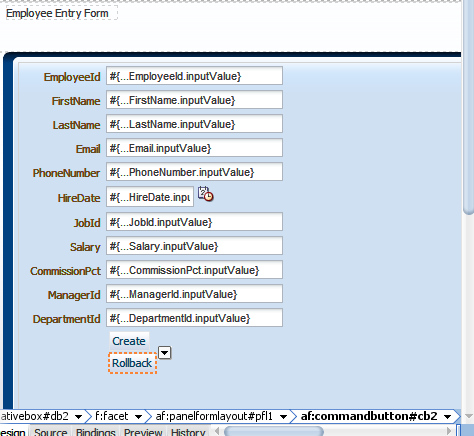
9.Select EmployeeVO and Expand the Data Control panel and Drag and drop the EmployeesVO1 to the   page Choose Query -> ADF

Form Panel as shown in Slide. 


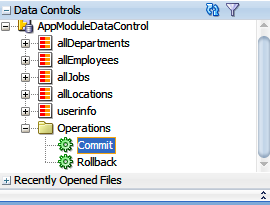
10.Add Commit and Create Operations in Page

Select DataControls -> DataEntryAMDataControl -> Operations

Drag Commit Operation in page

Similarly Select DataControls > DataEntryAMDataControl > EmployeesVO1 > Operations

Drag Create Operation in page


11.Drag ADF button to Page(Create and Commit)


12.Select Commit button and make field Disabled properties to NULL.
     

13. See EmployeeEntry Page Below.


 14.New Record in Database


Monday, 5 August 2013

Search Page in ADF

You can create search page that allow users to enter search criteria into input fields for known attributes of an object.The search criteria can be entered via input text fields or selected from a list of values in a popup list picker or dropdown list box. The entered criteria is constructed into a query to be executed. Named bind variables can be used to supply attribute values during runtime for the query. The results of the query can be displayed as a table, a form, or another UI component as per need.

Search page are based either on view criteria defined in view objects or on implicit view criteria defined by JDeveloper. Search pages are region-based components that are reusable and personalizable. They encapsulate and automate many of the actions and iterator management operations required to perform a query.
 You can create several search forms on the same page without any need to change.

1.Create New Application

  1.Application Name:EmployeeSearch
  2.Application Package Prefix:dilip.oracle.adf.searchEmp


 2.Create ADF Business Component(Enity Object,ViewObject,Application Module)

  1.Entity Object:
 
   Name:EmployeeEO
   Package:dilip.oracle.adf.searchEmp.entities
   Schema Object :Employees


  Enable Create Method and Remove Method


 Check Generate Default View Object CheckBox
  2.ViewObject:
   Name:EmployeeVO
   package:dilip.oracle.adf.searchEmp.service 


  Check Application Module CheckBox
  3.Application Module:
   Name:EmployeeAM
   package:dilip.oracle.adf.searchEmp.queries


3.Define Bind Variable:

   Double Click on EmployeeVO in Model  go to query page

   Expand the Bind variable accordion and click on Green button

   Bind Variable name and type as following make sure required check box is un-checked

   Name – empno

   Type -- Number


4. Create Named View Criteria

 Double Click on EmployeeVO in Model  go to query page. Expand the View Criteria accordion
  and  click on Green button


View Criteria is actually conditions on VOs which you usually define decoratively

     1.Expand the View Critieria Section in EmployeeVO page and click the Green plus sign

     2.Give a proper name to your View Criteria

       Criteria Name -> EmployeesVOCriteria

     3.Click on Add Item  Click the ( ) group press Add item and select values as sown in slide make sure
       you have selected the   bind    variable empno

          Attribute – Employee_id

          Operator – Equals

          Operand – Bind Variable

          Parameter – empno

          Un-check Ignore Case and Check Ignore Null Values


6. Create Search Page

Right Click on ViewController -> New -> Web Tier->JSF/Facelet->Page

File Name – EmpSearch

Initial Page Layout and Content – Quick Start Layout

Click on Browse and select One Column Stretched and check Apply Theme


7.Expand Page Implementation and Select Automatically Expose UI Components in a New Managed Bean

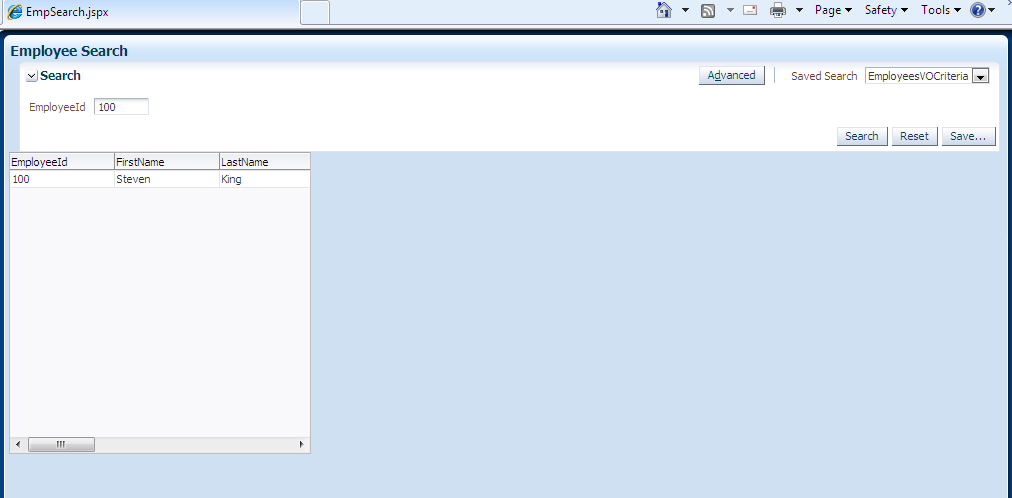
Select EmployeeVO and Expand the Data Control panel and Drag and drop the Named View Critieria “EmployeesVOCriteria” to the page Choose Query -> ADF Query Panel with Table as shown in Slide.


8.Change Search Header from "EmployeeEO" to Employee Search
   Change Text Property Search Employee.Also see resulted Search Page.